Design Creativity Icon Set 4: Elevating Visual Communication with Meticulously Crafted Glyphs
In the fast-paced world of digital design, clarity is king. We often spend hours perfecting typography and color palettes, yet it is the small, subtle elements that frequently determine whether a user interface feels intuitive or cluttered. This is where Design Creativity Icon Set 4 steps in, offering a collection of beautifully meticulously designed glyph icons that bridge the gap between aesthetic appeal and functional utility. These are not just generic symbols; they are thoughtfully constructed visual assets intended to enhance websites, printed materials, presentations, and promotional campaigns with a touch of professional polish.
Beyond Aesthetics: The Functional Power of Glyph Icons
When we talk about iconography, many designers immediately think of colorful illustrations or complex 3D renders. However, there is a distinct advantage to using clean, monochromatic glyphs, especially in information-dense environments. The Design Creativity Icon Set 4 focuses on this precision. By stripping away unnecessary noise, these icons allow the content to breathe while still providing immediate visual cues.
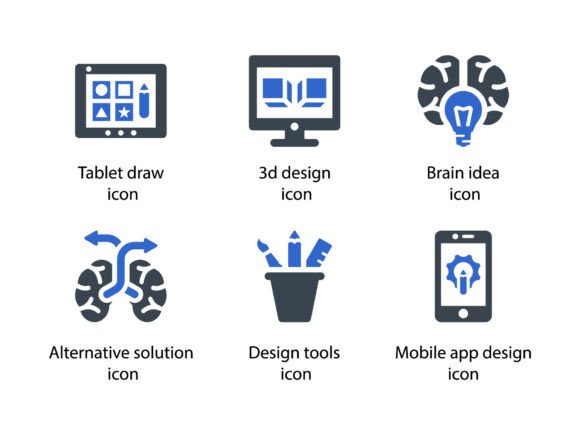
Consider the challenge of designing a dashboard for a SaaS platform. You have limited screen real estate and need to convey complex actions like "alternative solution," "brain idea," or "design tools" instantly. A bulky illustration might distract from the data, but a sleek glyph from this set communicates the concept without competing for attention. The inclusion of specific themes like tablet draw and mobile app design ensures that the iconography remains relevant to modern tech workflows, making it easier for users to navigate through creative processes.
Real-World Applications Across Industries
The versatility of this icon set means it serves a wide array of professionals, not just UI/UX designers. Here is how different sectors can leverage these assets effectively:
Web and App Development
For developers and front-end designers, consistency is crucial. Using a mix of icon styles can make an application feel disjointed. Design Creativity Icon Set 4 provides a unified visual language. Whether you are building a project management tool or a creative portfolio site, the included icons for "3d design" and "mobile app design" help categorize features logically. Because the files are available in SVG format, they scale perfectly across any device, ensuring that your interface looks crisp on a 4K monitor and a smartphone alike.
Marketing and Promotional Materials
Marketers often struggle to visualize abstract concepts like innovation or strategy. The "Brain idea" and "Alternative solution" icons in this set are perfect for breaking down complex value propositions in slide decks or brochures. Instead of writing a paragraph about your unique approach, you can pair a concise headline with a relevant glyph. This combination increases retention rates and makes promotional materials more scannable. The PNG files included are particularly useful here for quick drag-and-drop placement in social media graphics or email newsletters where editing vector files might be impractical.
Educational Content and Infographics
Creating engaging educational material requires balancing text with visual aids. Infographics thrive on simple, recognizable symbols. If you are explaining the stages of a design thinking process, using the "Tablet draw" and "Design tools" icons can guide the reader’s eye through the narrative. The meticulous design ensures that even when shrunk down to fit within a tight infographic layout, the details remain legible. This clarity helps learners grasp concepts faster, reducing cognitive load.
Technical Flexibility and File Formats
One of the most significant strengths of Design Creativity Icon Set 4 is the range of file formats provided. Understanding which format to use can save you considerable time during the production phase.
- EPS Files: Ideal for print professionals. If you are designing business cards, large-format banners, or high-quality brochures, EPS ensures that the vectors remain editable in software like Adobe Illustrator. You can adjust stroke weights or colors to match specific brand guidelines without losing quality.
- SVG Files: The gold standard for web development. SVGs are code-based, meaning they are lightweight and can be styled directly with CSS. This allows for interactive hover effects or color changes based on user preferences, such as dark mode toggles, without needing multiple image files.
- PNG Files: Perfect for quick implementations. When working in PowerPoint, Canva, or other non-vector-based tools, having high-resolution PNGs ready to go eliminates the need for conversion. They are also essential for email signatures and platforms that do not support vector graphics.
Choosing the Right Icons for Your Project
While the Design Creativity Icon Set 4 is comprehensive, effective design requires restraint. It is tempting to use every icon available, but overuse can lead to visual clutter. Before integrating these glyphs into your project, consider the context. Are you aiming for a minimalist look, or do you need bold indicators? The glyph style leans towards subtlety and elegance, making it best suited for professional, clean, and modern aesthetics.
Another consideration is cultural relevance. While icons like "Brain idea" are generally universal, always test your designs with your target audience to ensure the symbols convey the intended meaning. For instance, in some contexts, a lightbulb might represent electricity rather than innovation. However, the meticulous design of this set aims for broad recognizability, minimizing such ambiguities.
Enhancing Brand Identity Through Consistency
Brand identity is built on repetition and consistency. Using a cohesive icon set helps reinforce your brand’s personality. If your brand values precision and innovation, the clean lines of the Design Creativity Icon Set 4 align well with those traits. By consistently using these specific glyphs for key actions or categories across your website, app, and marketing materials, you create a familiar visual language that users begin to associate with your brand.
Moreover, the ability to customize these icons adds another layer of branding. Since you have access to the source files, you can tweak the corner radius, stroke width, or color to match your exact brand hex codes. This level of customization ensures that the icons do not look like stock assets but rather like bespoke elements created specifically for your company.
Final Thoughts on Visual Efficiency
In an era where attention spans are shortening, the ability to communicate quickly and beautifully is a competitive advantage. Design Creativity Icon Set 4 offers more than just a collection of images; it provides a toolkit for clearer communication. Whether you are sketching out a new mobile app interface, preparing a pitch deck for investors, or designing an informative brochure, these meticulously designed glyphs serve as reliable building blocks. By focusing on usability, flexibility, and aesthetic harmony, this set empowers creators to produce work that is not only visually appealing but also functionally superior.