3D Layered Welcome Card Design Guide
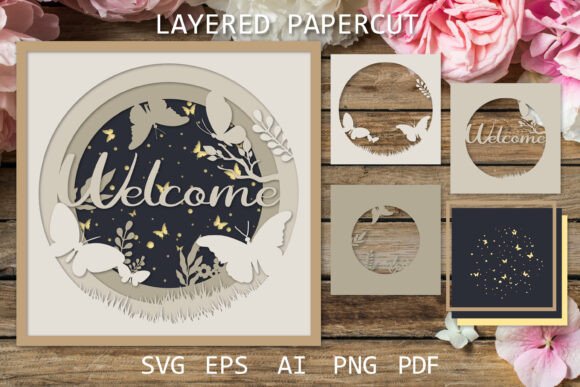
Crafting a memorable first impression often requires more than just words; it demands visual depth and tactile engagement. The Welcome Card Design 3D Layered SG offers a sophisticated solution for creators who wish to merge traditional paper artistry with modern digital precision. This design is not merely a static image but a blueprint for creating immersive shadow boxes and layered papercut projects that captivate the viewer. Whether you are a seasoned graphic designer, a hobbyist looking to elevate your greeting card game, or a small business owner aiming to create unique packaging inserts, understanding how to leverage this specific style of layered art can transform your creative output.
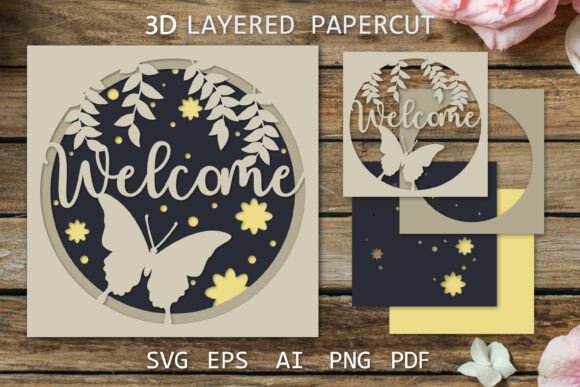
The core appeal of this design lies in its intricate "Forest Butterfly" motif, which utilizes the popular papercut aesthetic to create an illusion of depth. By stacking multiple layers of paper, each cut with precise details, you achieve a three-dimensional effect that draws the eye inward. This technique, often referred to as a shadow box, relies on the interplay of light and shadow between the layers. When executed correctly, the result is a piece that feels alive, changing slightly as the viewing angle shifts. For those who appreciate the delicate balance of nature-inspired themes and geometric precision, this template provides the perfect foundation.
Understanding the Technical Foundation
To successfully bring this design to life, one must first understand the digital assets provided. The Welcome Layered papercut files are delivered in a compressed ZIP archive, requiring extraction before use. This organization ensures that all necessary components are kept together, preventing the loss of critical layers during download. The design is optimized at a high resolution of 3000x3000 pixels, ensuring that whether you are printing a small card or a larger wall art piece, the edges remain crisp and clean.
Versatility is a key feature of this package. All elements are available as vector files, which means you can scale the design to any size without losing quality. This is particularly useful for designers who need to adapt the same motif for different formats, such as business cards, posters, or digital backgrounds. The inclusion of EPS10, AI, and PDF files allows for seamless integration into industry-standard software like Adobe Illustrator or CorelDRAW. For those who prefer working with raster images, high-quality PNG files with transparent backgrounds are included, making it easy to composite the design into other digital projects.
One of the most practical aspects of this template is the separation of layers. The files come with colored and black separated layers, giving you full control over the color palette. You might choose to stick to a monochromatic scheme for a classic, elegant look, or experiment with vibrant hues to match a specific brand identity or seasonal theme. The SVG files further enhance accessibility, allowing users with cutting machines like Cricut or Silhouette to import the designs directly for precise cutting.
Creative Applications for Diverse Creators
The utility of the Paper cut template for crafts extends far beyond simple greeting cards. For educators, this design can serve as an engaging project for teaching students about geometry, symmetry, and fine motor skills. The process of assembling the layers requires patience and precision, offering a mindful activity that results in a tangible reward. Teachers can use the black-and-white contour files to let students experiment with their own coloring techniques before assembly, fostering creativity and personal expression.
Small business owners and entrepreneurs can leverage this design to enhance their brand experience. Imagine including a miniature version of this forest butterfly shadow box in your product packaging. It transforms a standard unboxing experience into a memorable event, encouraging customers to share their purchase on social media. The visual appeal of 3D papercut art is highly shareable, providing organic marketing potential. Furthermore, the design can be adapted for wedding invitations, baby shower announcements, or corporate welcome kits, adding a touch of handmade warmth to professional communications.
For interior designers and home decor enthusiasts, scaling up this design creates stunning wall art. By using thicker cardstock or even lightweight wood veneer for the layers, you can create a durable piece that serves as a focal point in a living room or office. The "Forest Butterfly" theme brings a sense of calm and natural beauty into indoor spaces, aligning with biophilic design trends that seek to connect occupants with nature.
Mastering the Assembly Process
While the digital files provide the roadmap, the physical assembly is where the magic happens. To achieve the best results with your Papercut 3D project, attention to detail is paramount. The design includes small, intricate details, so using a sharp craft knife or a high-precision cutting machine is essential. Dull blades can tear the paper, ruining the clean lines that define the aesthetic. If you are cutting by hand, take your time and rotate the paper rather than the knife to maintain control over curved edges.
Spacing between layers is crucial for creating the desired shadow effect. Using foam tape or small spacers between each layer adds depth and prevents the shadows from becoming too dark or muddy. Experiment with different thicknesses of spacers to see how they affect the overall look. Thicker spacers create deeper shadows and a more dramatic 3D effect, while thinner spacers result in a subtler, more refined appearance. Lighting also plays a significant role; consider placing the finished piece in a spot where natural or directed light can highlight the contours of the butterflies and foliage.
The ZIP file includes folders with flipped layers, which are ready to print for hand paper cutting. This feature is particularly helpful for those who want to mirror the design or create symmetrical compositions. By utilizing these pre-prepared files, you save time on manual adjustments and ensure that your final product is balanced and proportionate.
Customization and Personalization
One of the greatest strengths of this template is its adaptability. Because the files are vector-based, changing colors is straightforward. You can match the design to specific color theories or brand guidelines. For a spring-themed welcome card, pastel greens and soft pinks might be appropriate. For a more formal corporate welcome, deep navy blues and metallic golds could convey professionalism and elegance. The ability to easily swap colors allows for endless variations without needing to redesign the entire structure.
Additionally, you can modify the background layers to include personalized text or logos. Since the foreground elements are separated, you can insert custom messages behind the butterfly motif, ensuring they are visible but not overpowering. This makes the design highly effective for personalized gifts or branded merchandise. The key is to maintain a balance between the intricate details of the papercut and the clarity of any added text.
When preparing your files for print, always check the bleed settings and ensure that your printer can handle the weight of the paper you have chosen. Heavier cardstock provides better structural integrity for the 3D layers but may require adjustments to your cutting machine’s pressure settings. Testing a single layer before committing to the full project can save materials and frustration.
Final Thoughts on Crafting with Precision
The Welcome Shadow box design represents a blend of artistic vision and technical execution. It invites creators to slow down and appreciate the process of building something layer by layer. In a digital world dominated by instant gratification, the tactile nature of papercraft offers a refreshing counterpoint. By utilizing the comprehensive file formats provided—from AI and EPS for professionals to PNG and SVG for hobbyists—you can tailor the project to your specific skill level and tools.
Whether you are creating a heartfelt welcome card for a new neighbor, a unique piece of decor for your home, or a distinctive branding element for your business, this design provides the structure you need to succeed. Remember to respect the small details inherent in the design, as they are what give the final piece its character and charm. With careful assembly and thoughtful customization, your Forest Butterfly papercut creation will not only welcome viewers but also inspire them with its beauty and craftsmanship.